Tabee: rename, pin, group and customize Chrome tabs automatically
Tabee: Tab Modifier is a free, open source Chrome extension that changes how your tabs look and behave, automatically. You create rules that match a URL (contains, starts with, ends with, exact or regex), and Tabee applies them to every matching tab: a new title, a custom icon, pinning, a tab group, muting, a confirmation before closing, or closing duplicates. It is used by 6,000 people, rated 4.9/5 on the Chrome Web Store from 39 ratings, and its code is public on GitHub.
★ 4.9/5 on the Chrome Web Store, 39 ratings6,000 usersOpen source (MIT)
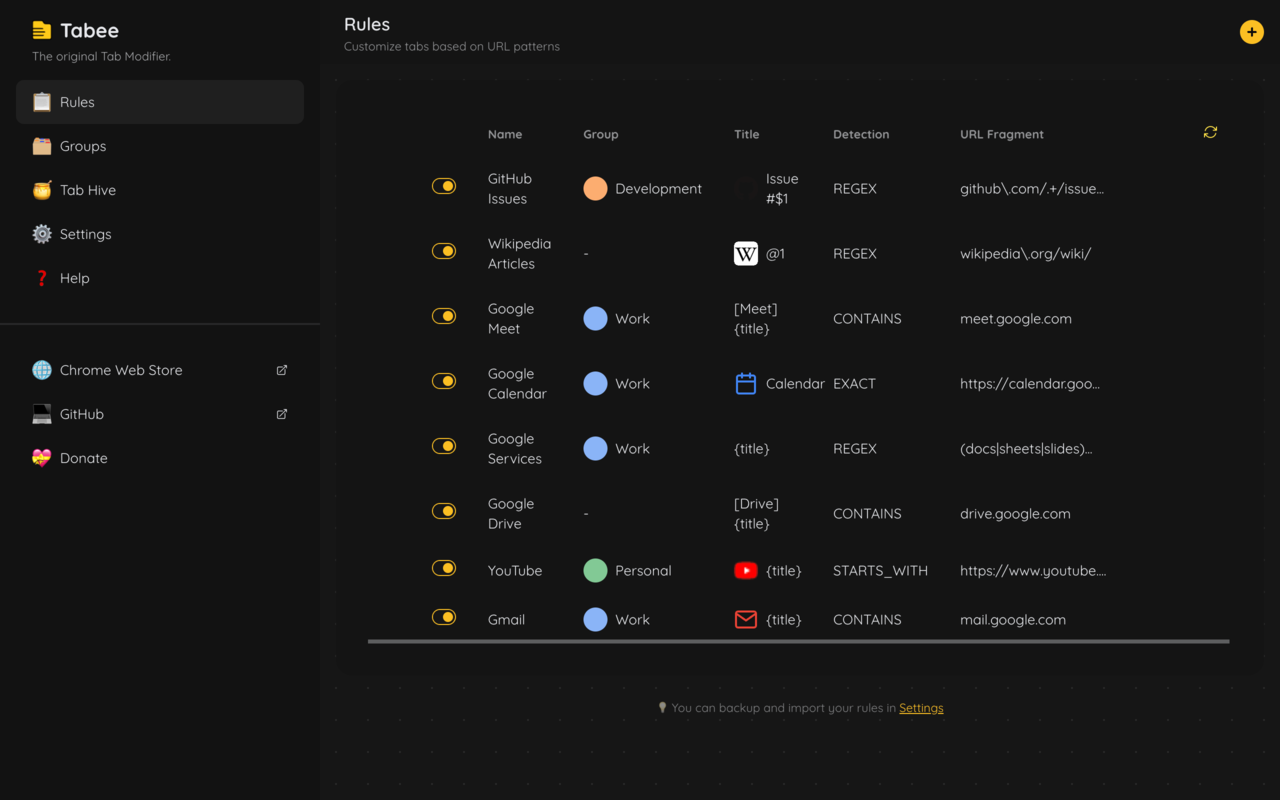
The rules list: one row per rule, with its group, title, detection and URL fragment.
Tabee was built by a web developer who kept losing track of identical tabs: local, staging and production copies of the same site all titled "My awesome website". A rule that adds [DEV], [STAGING] or [PROD] to the title fixed that, and the extension grew from there. It was first published as Tab Modifier; Tabee is the same extension, rebuilt.
Everything in Tabee is rule-based. When a tab opens or reloads, Tabee checks its URL against your rules from the top of the list and applies the first one that matches. Your rules stay in your browser.
What Tabee can do
Rename tabs
Rewrite the title of any tab. Use {title} for the original title, {.css-selector} to pull text from the page, $1 for a part of the URL captured by the URL matcher, and @1 for a part of the title captured by the title matcher. For a one-off change, right-click anywhere on a page and choose Rename Tab.
Example rule
Detection
Contains
URL fragment
localhost
Title
[LOCAL] {title}
A local copy of your app shows as [LOCAL] My app.
Change the tab icon (favicon)
Replace the favicon of a site with one of the built-in colored bullets or Chrome icons, an emoji, an image URL, or an image you paste straight into the field (it is converted to base64 for you).
Example rule
Detection
Contains
URL fragment
staging.yourapp.com
Title
[STAGING] {title}
Icon
bullets > bullet-amber
Pin tabs automatically
Pin a tab as soon as it opens, for the sites you always keep at hand: mail, calendar, documentation.
Example rule
Detection
Contains
URL fragment
/docs/
Pinned
ON
Group tabs automatically
Create named tab groups with a color, then send matching tabs into them. Tabee uses Chrome's own tab groups, so you can still collapse, move or rename them by hand.
Example rule
Detection
Contains
URL fragment
app.yoursite.com
Title
[PROD] {title}
Group
Production
Protect tabs from accidental closing
A protected tab asks for confirmation before it is closed or reloaded. Chrome only shows that dialog once you have interacted with the page (clicked or typed in it).
Example rule
Detection
Starts with
URL fragment
https://docs.google.com/document/
Protected
ON
Keep a single tab per site
With Unique on, opening a second tab that matches the rule closes the duplicate, so you keep one Gmail or one dashboard tab.
Example rule
Detection
Starts with
URL fragment
https://mail.google.com
Unique
ON
Mute tabs automatically
Mute every tab of a site as soon as it opens, for video or social sites that start playing sound on their own.
Example rule
Detection
Contains
URL fragment
youtube.com
Muted
ON
Tab Hive: close inactive tabs and restore them later
Optional. Tab Hive closes tabs you have not used for a set time (30 minutes by default) and keeps them in a list you can search and restore from the side panel, grouped by domain. Pinned tabs are skipped, and you can exclude a domain or a URL from the right-click menu.
Spot Search: find any tab or bookmark
Press Alt+Shift+E (Cmd+Shift+E on Mac) to search all open tabs and bookmarks by title, URL or tab group name, then use the arrow keys and Enter to jump to the result.
Merge all windows
Press Alt+Shift+W (Cmd+Shift+W on Mac), or use the right-click menu, to bring every open window into the current one. Shortcuts can be changed at chrome://extensions/shortcuts.
Lightweight mode
Turn Tabee off on the domains or URL patterns you choose, for its rules, for Tab Hive, or both, to keep heavy web apps untouched.
Import, export and themes
Export your rules and groups to a JSON file for backup or to share them, and import a file to merge it with your rules or replace them. The options page comes in seven themes: Tabee, Dim, Dark, Halloween, Light, Cupcake and Valentine.
How a Tabee rule works
Name: a label to find the rule in your list.
Detection: how the URL is compared. Contains (the default), Starts with, Ends with, Exact or Regex.
URL fragment: the text or pattern to look for, for example github.com or https://mail.google.com.
Actions: any mix of title, icon, group, pinned, protected, unique and muted.
Rules are checked from the top of the list when a tab opens or reloads; the first match wins, so put specific rules above general ones.
Chrome has no built-in way to rename a tab. With Tabee installed, right-click anywhere on the page and choose Rename Tab for a quick change. To rename that site every time, open Tabee, add a rule with Contains and the site's domain, and type the new title; {title} keeps the original title inside yours.
Create a Tabee rule that matches the site, then pick an icon: a built-in colored bullet or Chrome icon, an emoji, an image URL, or an image you paste into the icon field. The new icon replaces the favicon in the tab strip every time the site loads.
Add a rule with Starts with and https://mail.google.com, and turn Pinned on. Every Gmail tab is pinned as soon as it opens. Turn Unique on as well if you want Tabee to close extra Gmail tabs.
In Tabee's Groups page, create a group (for example "Work", in blue). Then add a rule per website, such as Containsdocs.google.com, and choose that group. New tabs from that site join the group automatically. One Regex rule like (docs|sheets|slides)\.google\.com can cover several sites at once.
Turn Protected on in a rule for that site. Chrome will then ask you to confirm before the tab is closed or reloaded. Chrome only shows this dialog after you have clicked or typed in the page, which is a browser rule, not a Tabee setting.
Add a rule with Contains and the site's domain, for example youtube.com, and turn Muted on. Every tab of that site opens muted; you can still unmute one from the tab's menu.
Give each environment its own rule: Containsstaging.yourapp.com with the title [STAGING] {title} and an amber bullet icon, and Containsyourapp.com with [PROD] {title} and a red bullet. Keep the staging rule above the production rule, because the first match wins.
Where Tabee fits among tab extensions
Tab extensions solve different problems. Tabee is a tab modifier: it changes how each open tab looks and behaves, from rules. Workspace and session managers such as Workona, Toby, OneTab or Tab Session Manager save and reopen sets of tabs. They are complementary.
Kind of tool
What it does
Examples
Pick it when
Tab modifier
Renames, re-icons, pins, groups, mutes and protects tabs automatically, from rules on the URL
Tabee
You keep many tabs open and want to recognize and organize them without doing it by hand
Workspace manager
Saves sets of tabs as workspaces or collections you can switch between
Workona, Toby
You switch between projects and want to reopen a whole set of tabs at once
Tab list
Turns open tabs into a list you can restore later
OneTab
You want to park dozens of tabs and close them for now
Session manager
Saves and restores whole windows and sessions
Tab Session Manager
You want snapshots of your windows to restore later
Choose Tabee when the problem is finding and recognizing tabs: identical titles, sites you always pin, tabs you close by mistake, duplicates, noisy tabs. Tabee does not save workspaces or named sessions.
You can combine Tabee with a session or workspace manager. Tabee acts on each tab when it loads, so tabs reopened by another extension get your titles, icons and groups again.
Screenshots
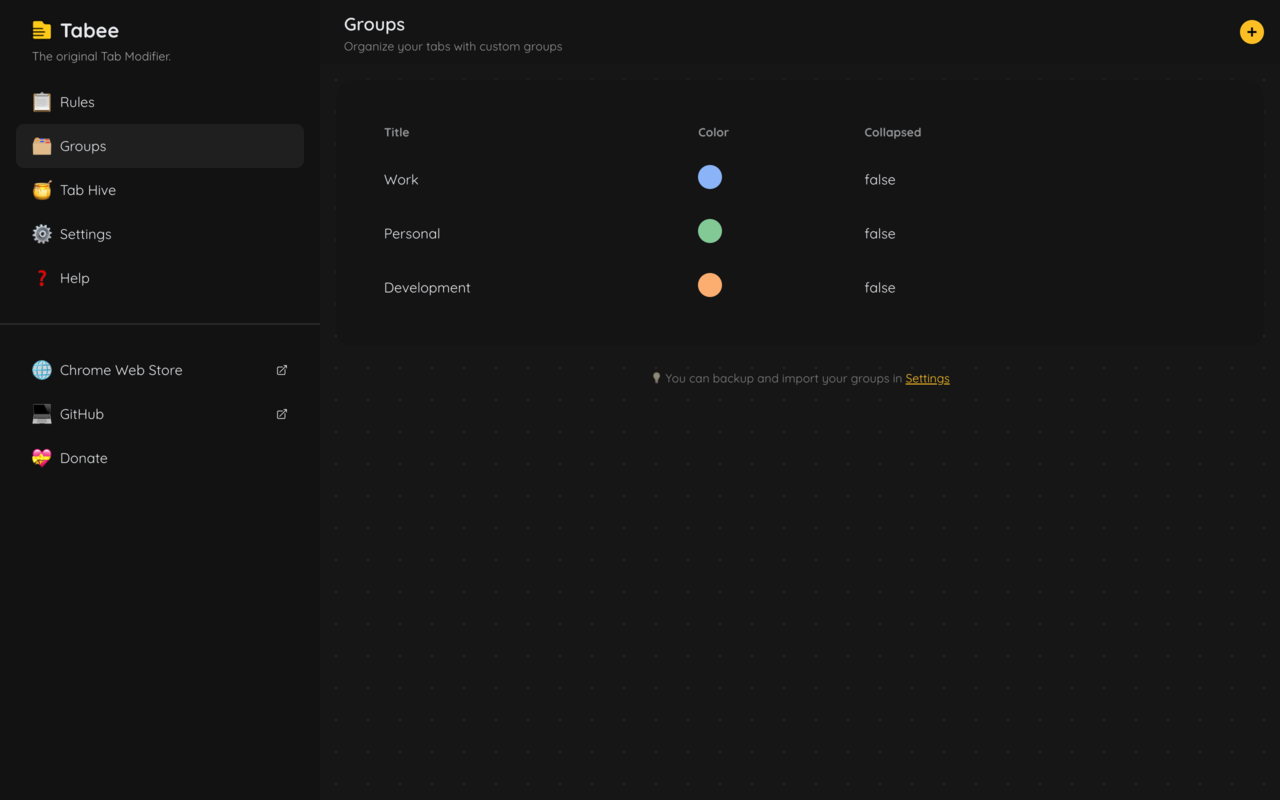
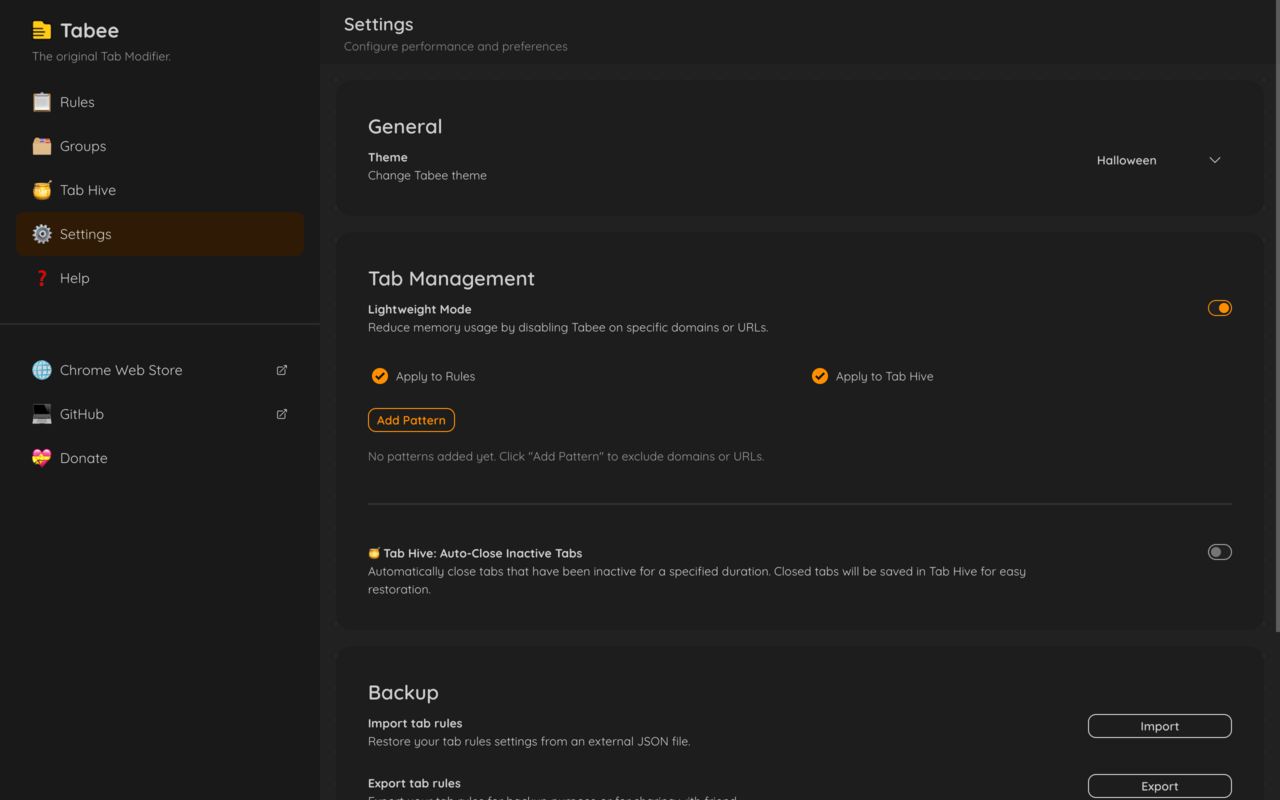
The rules list: one row per rule, with its group, title, detection and URL fragment.Groups: named, colored Chrome tab groups that rules can send tabs to.Settings: options page theme, lightweight mode, Tab Hive and import/export.
tabsRead the URL and title of your tabs to match rules, and pin or mute them.
tabGroupsCreate tab groups and move matching tabs into them.
storageSave your rules and settings in your browser.
contextMenusAdd the right-click items: Rename Tab, Merge All Windows and the Tab Hive actions.
scriptingAdd the "are you sure?" check to protected tabs.
sidePanelShow the side panel with quick actions and Tab Hive.
bookmarksSearch your bookmarks in Spot Search.
alarmsCheck once a minute for inactive tabs when Tab Hive is on.
http://*/*, https://*/*Change the title and icon inside the pages you visit (http and https sites).
Privacy
Tabee does not collect or send your data. Its Chrome Web Store listing declares that it does not collect or use your data, and its open source code contains no analytics or remote server: rules, groups and settings are stored locally in your browser (chrome.storage.local).
Good to know
Chrome system pages (chrome://) are protected, so no extension can change them.
Local files (file:///) work only after you turn on Allow access to file URLs in Tabee's details at chrome://extensions.
Icons from a file:// path are blocked by the browser; use an image URL, paste the image, or use a data URI.
Yes. Tabee is the new name of Tab Modifier, by the same author, with the same Chrome Web Store listing and GitHub repository. Its listing calls it "the original Tab Modifier reborn".
Yes. The code is published under the MIT license at github.com/furybee/chrome-tab-modifier, where the project has 701 stars. Each change goes through automated malware, secret and dependency checks.
No. Tabee has no analytics and talks to no server of its own. Your rules are stored locally in your browser. The only network requests it can cause are the ones you set up yourself, such as loading a custom icon from an image URL.
To change the title and icon of a page, Tabee has to run a small script inside that page, and it cannot know in advance which sites your rules will target. It reads the tab URL to find matching rules and the page title to rewrite it; other text on the page is read only when one of your titles uses a CSS selector.
No. Current versions keep rules in local storage on each computer, so Chrome Sync does not copy them. To use the same rules on another device, export them to a JSON file in Settings and import that file there.
Open Tabee's Settings and click Export to download your rules and groups as JSON. Use Import to restore them, either merged with your current rules or replacing them.
Yes. Choose Regex as the detection to match URLs with a pattern. The URL matcher and title matcher also take a regex, and their capture groups can be reused in the title as $1 or @1. Tabee rejects patterns known to freeze the browser (ReDoS), such as nested quantifiers.
Tabee works in Chromium-based browsers. Brave and Arc install it from the Chrome Web Store. Microsoft Edge can install it from the Chrome Web Store once you allow extensions from other stores; it is not on Edge Add-ons yet. There is no Firefox or Safari version.
Tabee is small (308 KiB) and applies rules when a tab loads or its title changes. If a heavy web app needs to be left alone, add it to Lightweight mode and Tabee will skip it. Tab Hive can also close inactive tabs for you, which frees memory.